From 49 to 87: an enforced CSP, caching and image fixes on a React SPA, without breaking production

A security scanner gave our student site 49/100, "Critical CSP gaps". There was no Content-Security-Policy at all, the favicon alone weighed 601 KB, and nobody had looked at how the frontends were cached or compressed.
The stack: three React + Vite single-page apps (students, teachers, admins), each served by nginx in a container, behind a host nginx and Cloudflare, talking to FastAPI backends. Two environments, dev and prod, on two VPSs.
By the end of the day, both environments enforced a CSP, the scanner said 87/100, "Solid CSP setup", the heaviest images were 90–99% smaller, and nothing broke. This post is the order I did it in, the configuration, and the things that surprised me, including one the CI pipeline could never have caught.
1. Assess before touching anything
I measured the live sites through Cloudflare first, with plain curl:
curl -s -o /dev/null -D - -H "Accept-Encoding: br, gzip, zstd" https://example.com/ \
  | grep -iE "^(content-encoding|cache-control|cf-cache-status|content-security|strict)"
| Area | Found | Verdict |
|---|---|---|
index.html | no-cache, must-revalidate | correct: new deploys show up at once |
Hashed /assets/* | 1 year, immutable, Cloudflare HIT | correct |
| API responses | not cached by Cloudflare | correct |
Files from public/ | no header, so Cloudflare's 4 h default | should be explicit |
| User uploads (MinIO) | 4 h default | names are random UUIDs, so could be much longer |
| HTML/API compression | zstd from Cloudflare | fine |
| JS/CSS compression | gzip level 1 from the container | room to improve |
| Favicon | 601 KB PNG, 4000×4000, on every page | broken |
| CSP | none | the scanner's complaint |
Two things stood out: the caching was already mostly right, and the biggest performance problem was not compression or caching at all. It was images.
2. Images: the biggest win, and the easiest
| File | Before | After | How |
|---|---|---|---|
| Favicon | 601 KB (4000 px PNG) | 3 KB | 48 px PNG + 180 px apple-touch-icon |
| Mascot illustration | 902 KB PNG | 51 KB | WebP, 768 px (shown at ~112 px) |
| Landing image | 296 KB PNG | 27 KB | WebP |
| Teacher-app logo | 215 KB (4000 px) | 54 KB | resized to 512 px in place |
| Certificate fonts (4) | 1.2 MB TTF | ~60% smaller | WOFF2, TTF kept as fallback |
| Two images referenced nowhere | 2.0 MB | deleted | grep across all repos first |
A dozen lines of Pillow did all of it:
from PIL import Image

def webp(src, dst, max_side=None, quality=82):
    im = Image.open(src)
    if max_side and max(im.size) > max_side:
        im.thumbnail((max_side, max_side), Image.LANCZOS)
    im.save(dst, "WEBP", quality=quality, method=6)

icon = Image.open("public/images/logo-fab-icon.png")       # 4000 x 4000
for name, size in [("favicon-48.png", 48), ("apple-touch-icon.png", 180)]:
    i = icon.copy(); i.thumbnail((size, size), Image.LANCZOS)
    i.save(f"public/images/{name}", optimize=True)
The fonts are used for downloadable certificates rendered with html2canvas. WOFF2 is safe there because html2canvas reads fonts the browser has already loaded, but I kept the TTF as a fallback source anyway; it costs nothing, because the browser only downloads the first format it supports:
@font-face {
  font-family: 'CertBody';
  src: url('/fonts/certificate/Lora-Variable.woff2') format('woff2'),
       url('/fonts/certificate/Lora-Variable.ttf') format('truetype');
  font-display: swap;
}
Before deleting "unused" images I searched every repository, not just the frontend: emails and mobile apps often hot-link a site's images by URL.
3. Cache rules that match how files change
The rule is simple: cache by how a file's name changes.
- Vite fingerprints everything in
/assets, so a changed file always gets a new name: cache forever. index.htmlnever changes name and carries the hashed asset names: never cache it.- Files copied from
public/keep their names across deploys: cache briefly, revalidate.
server {
    listen 80;
    root /usr/share/nginx/html;
    index index.html;
    charset utf-8;

    include /etc/nginx/snippets/security-headers.conf;

    # ^~ stops the image regex below from catching hashed images in /assets.
    location ^~ /assets/ {
        expires 1y;
        add_header Cache-Control "public, immutable";
        include /etc/nginx/snippets/security-headers.conf;
        try_files $uri =404;
    }

    location = /index.html {
        add_header Cache-Control "no-cache, must-revalidate";
        include /etc/nginx/snippets/security-headers.conf;
    }

    # Same name across deploys: an hour, then serve stale while revalidating (a 304).
    location ~* \.(?:png|jpe?g|gif|webp|svg|ico|woff2?|ttf)$ {
        add_header Cache-Control "public, max-age=3600, stale-while-revalidate=86400";
        include /etc/nginx/snippets/security-headers.conf;
        try_files $uri =404;
    }

    location / {
        try_files $uri $uri/ /index.html;
    }
}
Three gotchas:
add_headerin alocationdrops everyadd_headerinherited from the server block. That is why the security-headers snippet is included again in each location. Forget it, and your CSP silently disappears from exactly the responses that set a cache header, includingindex.html.^~matters. Without it, a regex location wins over a prefix location, and/assets/logo-a1b2c3.svgwould get the one-hour rule instead ofimmutable.- Cloudflare can override you. The zone's Browser Cache TTL (4 hours by default) replaces any origin
max-agethat is lower. My 1-hour header arrived asmax-age=14400. If you want your own value, set that option to "Respect Existing Headers".
User uploads (served from MinIO) are stored as <folder>/<uuid4>.<ext>, so a name is never reused. I confirmed that in the upload code before trusting it, then gave them 30 days, not a year, so a deleted file does not linger at the edge:
location /storage/ {
    include snippets/proxy.conf;
    include snippets/security-headers.conf;
    proxy_hide_header Cache-Control;
    add_header Cache-Control "public, max-age=2592000, immutable";
    # MinIO sends its own copies of these; without hiding them, every
    # response carried HSTS and nosniff twice, plus internal request ids.
    proxy_hide_header Strict-Transport-Security;
    proxy_hide_header X-Content-Type-Options;
    proxy_hide_header X-Amz-Id-2;
    proxy_hide_header X-Amz-Request-Id;
    proxy_pass http://127.0.0.1:9000/;
}
The duplicate headers only showed up because I read a full response after the change. Testing one header with grep would have missed them.
4. Compression: an experiment that did not pay off
My theory: the container gzips at level 1, Cloudflare passes an origin gzip straight through, so turning off gzip in the container would let Cloudflare apply Brotli or zstd itself. I shipped it to dev and measured the main bundle (717 KB raw):
| Encoding | Bytes on the wire |
|---|---|
| Cloudflare zstd (what Chrome negotiates) | 203 KB |
| Cloudflare Brotli | 197 KB |
| Before: origin gzip, passed through | 197 KB |
| Brotli level 11 at build time (best possible) | 165 KB |
Cloudflare compresses on the fly at a modest level, so the change gained nothing, and Chrome actually received 3% more. The real 15–20% would need pre-compressed .br files, which the stock nginx image cannot serve without a module, or hand-written Content-Encoding rules, where a mistake breaks the whole site.
I left it there. For hashed assets cached for a year, compression only matters on the first visit; the image work saved roughly ten times more. Measure before believing a theory, including your own.
5. Code splitting the one app that had none
Two apps already lazy-loaded their routes. The admin app shipped all 20 pages in one 720 KB bundle. Every page except login became a lazy chunk:
import React, { Suspense, lazy } from 'react';

const DashboardPage = lazy(() => import('./pages/DashboardPage'));
const StudentsPage = lazy(() => import('./pages/StudentsPage'));
// ...17 more

<Router>
  <Suspense fallback={<div style={{ minHeight: '100vh' }} aria-busy="true" />}>
    <Routes>{/* unchanged */}</Routes>
  </Suspense>
</Router>
plus stable vendor chunks, so a deploy that only touches pages keeps the vendor file names (and the browser's cache):
build: {
  rollupOptions: {
    output: {
      manualChunks: {
        'vendor-react': ['react', 'react-dom', 'react-router-dom'],
        'vendor-faro': ['@grafana/faro-web-sdk', '@grafana/faro-web-tracing'],
      },
    },
  },
},
First load went from about 720 KB to 550 KB, and each page now downloads on first visit.
6. Writing a CSP that will not break the site
A CSP that breaks the site gets removed the same afternoon. So I started with an inventory, not a policy.
Every external host, inline script and eval, across every chunk. The entry bundle is not enough: lazy chunks load later and can pull in anything. I fetched the HTML, every /assets/*.js it referenced, then every chunk those referenced:
for c in $(grep -oE 'assets/[A-Za-z0-9_.-]+\.js' all.js | sort -u); do
  curl -s "https://$HOST/$c" >> all.js
done
grep -oE 'https://[a-zA-Z0-9.-]+\.[a-z]{2,}' all.js | sort -u       # external hosts
grep -cE '[^a-zA-Z_.]eval\(|new Function\(' all.js                  # eval
grep -c '<script>' index.html                                        # inline scripts
Result: 82 chunks, no inline scripts, no eval, and a short list of real dependencies: Google Sign-In (accounts.google.com/gsi), Google Fonts in the admin app, one Unsplash image, and the API host. (The two WebAssembly hits were a keyword list inside the code highlighter.)
Then the product question that shaped the policy: teachers paste external URLs into course content, such as YouTube videos, PDFs and slide embeds from anywhere. An allow-list for media and frames would break courses, so those directives allow any https: origin. Scripts and network calls, where XSS actually does its damage, stay strict:
default-src 'self';
script-src  'self' https://accounts.google.com/gsi/client 'report-sample';
style-src   'self' 'unsafe-inline' https://accounts.google.com/gsi/style 'report-sample';
img-src     'self' data: blob: https:;
media-src   'self' https:;
frame-src   'self' https:;
object-src  'self' https:;
connect-src 'self' https://api.example.com https://accounts.google.com/gsi/;
base-uri 'self'; form-action 'self'; frame-ancestors 'self';
report-uri /csp-report; report-to csp
style-src 'unsafe-inline': MUI and emotion inject<style>tags at runtime. This is the standard trade for these libraries.- No nonces or
'strict-dynamic': the scanner recommends them, but a nonce has to be generated per request into the HTML. These are static bundles served by plain nginx, and they have no inline scripts to protect.'self'plus one exact Google path is already strict. object-srcis not'none': PDFs render in<object>because it offers a "can't display, open the PDF" fallback on phones, which an<iframe>cannot.blob:only where it is used: image previews of uploads. No frames, objects or workers needed it.
7. The policy belongs to the code; the mode belongs to the environment
My first version put the CSP in the host nginx, managed by Ansible. It worked, and it was the wrong home. A developer who adds a third-party script would have to change an infrastructure repository too, or break the site.
The policy moved into each frontend repository, next to the code that needs it. But dev and prod build from the same code, and I wanted dev to enforce while prod only reported. If the mode lived in the code, the next routine dev → main merge would enforce prod by accident.
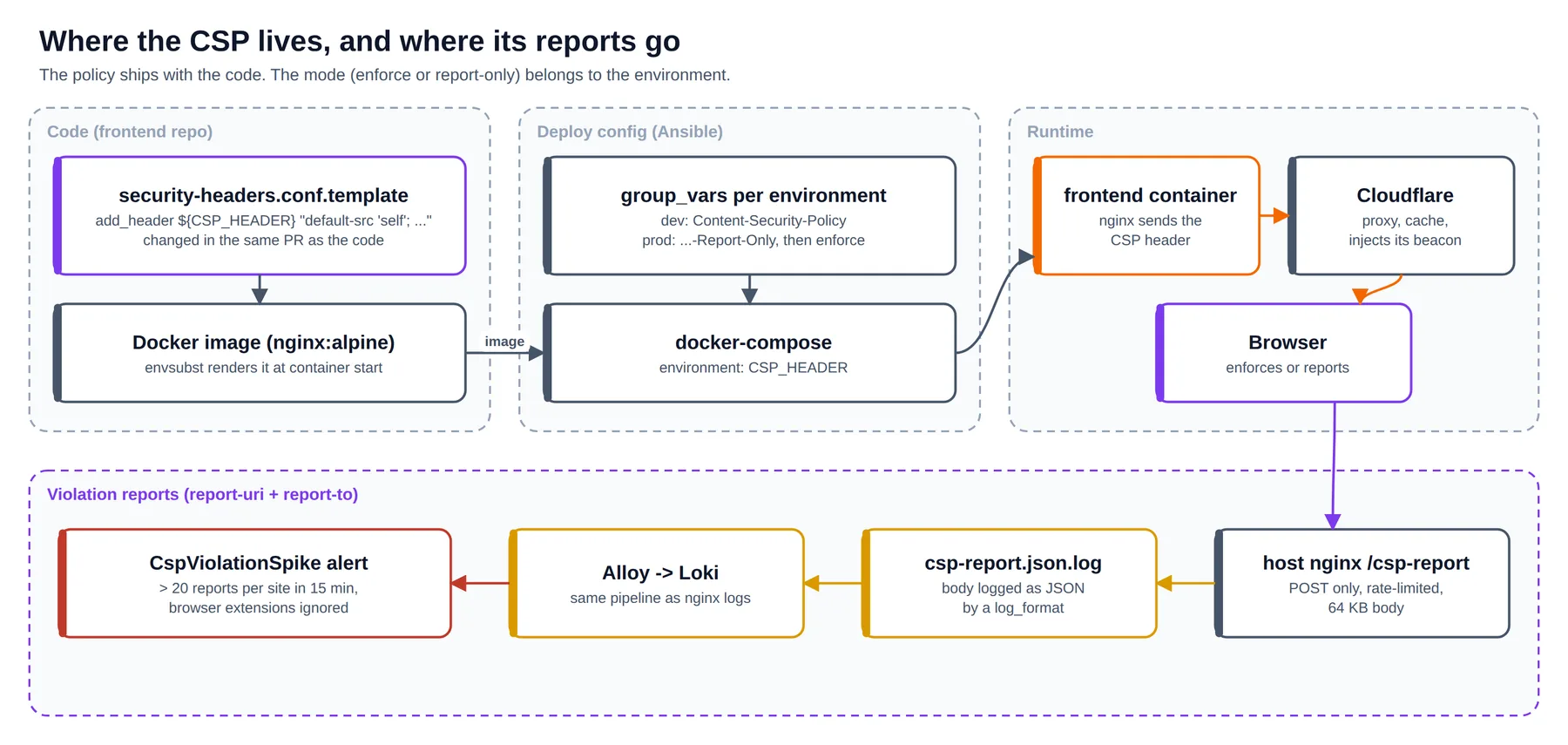
The official nginx image renders templates with envsubst at container start, which solves this neatly:
# security-headers.conf.template (in the frontend repo)
add_header ${CSP_HEADER} "default-src 'self'; script-src 'self' ...; report-to csp" always;
add_header Reporting-Endpoints 'csp="https://$host/csp-report"' always;
RUN mkdir -p /etc/nginx/snippets
COPY security-headers.conf.template /etc/nginx/templates/security-headers.conf.template
ENV NGINX_ENVSUBST_OUTPUT_DIR=/etc/nginx/snippets \
    CSP_HEADER=Content-Security-Policy-Report-Only
# docker-compose (rendered by Ansible, per environment)
environment:
  CSP_HEADER: Content-Security-Policy   # dev enforces; prod set to -Report-Only first
Two things I only learned by running it in a container:
- The output directory must exist. Without
mkdir -p, the entrypoint logs/etc/nginx/snippets is not writableand nginx fails to start on the missing include. A build that passes and a container that will not start is the worst kind of failure, so test the image, not just the build. $hostsurvives. The image'senvsubstonly substitutes variables that are defined in the environment, so nginx's own$hostis left alone. I checked: the rendered header saidcsp="https://admin.example.com/csp-report".
Rolling back is now one variable and a container restart.
8. Violation reports into the log pipeline you already have
Report-only mode is only useful if someone reads the reports. Rather than run a reporting service, the host nginx logs the report body as JSON into a file that the existing log agent already ships to Loki:
log_format csp_report escape=json '{"time":"$time_iso8601","vhost":"$server_name",'
  '"user_agent":"$http_user_agent","status":$status,"csp":"$request_body"}';

# $request_body is only populated when nginx reads the body, i.e. when it proxies.
# A tiny local sink that answers 204 makes that happen.
server {
    listen 127.0.0.1:8099;
    access_log off;
    location / { return 204; }
}

# in each site's server block:
location = /csp-report {
    limit_req zone=faro burst=20 nodelay;
    limit_except POST { deny all; }
    client_max_body_size 64k;
    client_body_buffer_size 64k;    # keep the body in memory so it can be logged
    access_log /var/log/nginx/csp-report.json.log csp_report;
    proxy_pass http://127.0.0.1:8099;
}
A Loki alert fires when a site gets more than 20 reports in 15 minutes, ignoring browser extensions, which inject their own scripts and are pure noise:
sum by (vhost) (count_over_time({job="nginx", filename=~".*csp-report.*"}
  !~ "(chrome|moz|safari-web)-extension" [15m])) > 20
9. The rollout, and what each step caught
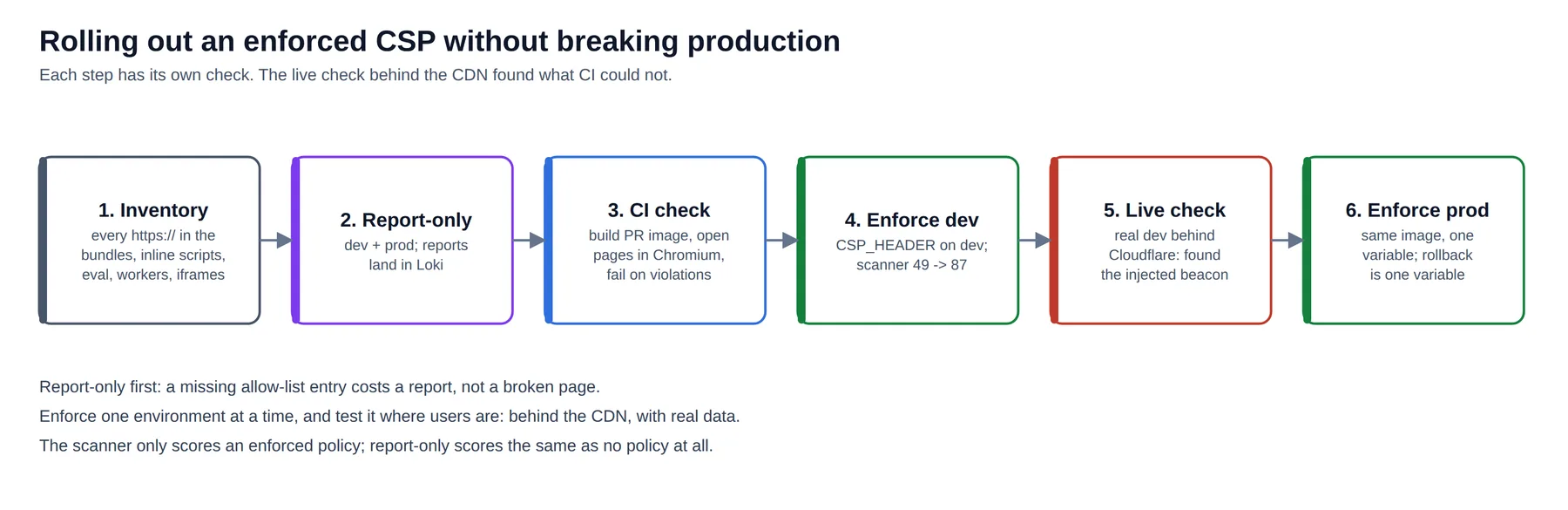
CI check. For the rollout I added a pull-request job that builds the real image, starts it, and opens the public pages in headless Chromium. Report-only still fires the securitypolicyviolation event, so gaps show up before anything is enforced:
await page.exposeFunction('__reportCsp', (v) => found.push(v));
await page.addInitScript(() => {
  document.addEventListener('securitypolicyviolation', (e) =>
    window.__reportCsp({ directive: e.effectiveDirective, blocked: e.blockedURI,
                         source: e.sourceFile, line: e.lineNumber, sample: e.sample }));
});
const res = await page.goto(base + path, { waitUntil: 'load' });
await page.waitForTimeout(4000);   // lazy chunks, fonts, Google Sign-In
It passed on 18 public pages, and its first run found a real data problem: some course images on dev still pointed at http://localhost:9000/..., left over from local development. Those never load for anyone, CSP or not, so the check reports them as warnings rather than failures.
Enforce dev. One variable. The scanner went from 49 to 87.
Live check, behind the CDN. I ran the same Playwright check against the real dev sites, through Cloudflare, with the policy enforced. Every page failed with the same violation:
script-src-elem blocked https://static.cloudflareinsights.com/beacon.min.js/...
Cloudflare Web Analytics injects its beacon into every page at the edge. It is not in the build, so the CI check, which ran the container directly, could never see it. The site still worked; only Cloudflare's analytics was blocked. The fix was two hosts in the policy (or turning the feature off, since we already had real-user monitoring). Without the live check, the first sign would have been a flat line in an analytics dashboard weeks later.
Enforce prod. Same image, one variable, then the live check again: 13 public pages, 0 violations.
We later retired the pull-request job; the runtime reports and the alert cover the same ground for day-to-day changes. For the rollout itself, it was worth it.
10. What the scanner still flags, and why that is fine
87 is not 100, and that is deliberate:
| Finding | Why it stays |
|---|---|
img-src / frame-src / object-src allow https: | Teachers embed external media; an allow-list breaks courses. |
style-src 'unsafe-inline' | Required by MUI/emotion. Scripts, where XSS executes, are strict. |
No nonces / 'strict-dynamic' | Static bundles with no inline scripts; a nonce would need per-request HTML rendering. |
| No Trusted Types | Some HTML-rendering code needs refactoring first. |
| No Subresource Integrity | A good next step: Vite can add integrity hashes at build time. |
| Report endpoint on the same origin | Intentional: no third party receives page URLs and user agents. |
A security score is a conversation starter, not a target. Every remaining point should either be fixed or have a sentence like the ones above.
Takeaways
- Assess first. Most of the caching was already right; the real problem was a 601 KB favicon.
- Images before compression. The image work saved about ten times more than any encoding change, and the encoding change I was sure about gained nothing.
- Cache by how a name changes: hashed means forever,
index.htmlmeans never, fixed names mean briefly. And mind nginx'sadd_headerinheritance. - Inventory every chunk before writing a CSP, and let the product shape the policy: strict for scripts and connections, open where users legitimately embed content.
- Put the policy in the code and the mode in the environment. Enforcement then becomes a deploy-config change with a one-line rollback.
- Report-only first, one environment at a time, and test where users are. Behind the CDN, with real data, is where the surprises live.
If you run a similar setup, the bigger picture of how these sites are monitored is in Production observability on two small VPSs.